Drive every issue to merged — on one fixed backbone.
keel turns coding agents into work owners. A project-neutral, multi-agent workflow backbone drives GitHub issues from intake to done with /keel:ship. (/keel:swarm aims the same backbone at a whole backlog as parallel DAG waves, but it is experimental: a live run opens one pull request per cluster that the swarm reviews only with the opt-in swarm-review, which has run once, on a sandbox repository, with single-vendor review seats — see #1423 — and the live landing before it, on the same sandbox repository, had its reviews done outside the swarm (#1281).)
Then put it in front of your agent as a plugin — Claude Code, Codex, Antigravity and Cursor (partial) each have their own command, and their own update path (all four). The plugin replaces the install-adapter step, not the CLI: the commands it ships shell out to keel. In Claude Code:
>/plugin marketplace add berkayturanci/keel
…then /plugin install keel. Two steps: registering the marketplace does not install the plugin.
Or pin a release:
$pip install "git+https://github.com/berkayturanci/keel@v1.28.0"






Optional companion —
keel-visual:
an animated 2D/3D visualizer that renders any run from the ledger it already writes.
Terminal play / dash and a web render.
keel-visual on PyPI →
Built for long unattended runs: six practices, and a real run keel stopped at the merge. Read the write-up →
What it is
An agentic work-ownership backbone
keel is based on the work pattern of a strong teammate in a real engineering team: take an issue from the queue, decide whether it's ready, own the implementation, get it reviewed, keep the quality gates green, merge inside policy, and leave useful memory behind for the next session. It is not another isolated coding command, review bot, or merge queue — it's the spine that makes an agent accountable for the whole path.
What you get
--no-jury; gates: [jury] adds an s8 run. Without the binary the s8 run is a no-op (reported SKIPPED; with no other gate planned it blocks), but the merge still needs a jury verdict unless the run passes --no-jury; a verdict from fewer than 2 vendors is advisory.keel merge path — resource claim, window re-check, live CI rollup, and PR evidence verification before the merge — plus the timezone-aware night no-merge window, mkdir merge lock, risk-tier → reviewer count, hotfix bypass with an audit line, and vendor+model attribution.The backbone
One fixed, ordered step machine
Every unit of work travels the same 13 steps — s0 config through s12 close. Every step exposes add-only extension slots — 28 named slots in total — where a project snaps in its own gates and steps; slots can extend the machine but never reorder or remove it, and invariants like the merge lock and window can't be overridden. Below: the safety primitives pinned to the spine, and which command covers which steps — hover a step for its slots, hover a command strip to see its span.
The ordered step machine
| step | name | does | primary hooks |
|---|
hook all 28 hooks are add-only extension slots — every step exposes them; a project snaps in its own Lego and can never reorder or remove the machine. agent the step's work is produced by a coding agent (Claude Code, Codex, Cursor, Antigravity, …) — but only the orchestrator writes to git/PRs. hook amber hooks are primary slots that can own or shape the step's outcome (after-implement, reviewers, capture, post-merge); grey ones are passive before/after points that observe without gating. guard ⊘ red slots can block the run — guard (s3), tester / test (s8) and pre-merge (s10) stop work when their checks fail.
Invariants the backbone always preserves
How it compares
Between three tool categories
keel is not trying to replace coding agents, PR reviewers, or merge queues — it's the work-ownership backbone that can use all three in one lifecycle.
Visual
See every run — 2D & 3D
keel-visual is an optional companion that renders any run from the ledger keel already writes — no extra wiring. A 2D flow and an animated 3D scene, in the terminal or the browser.
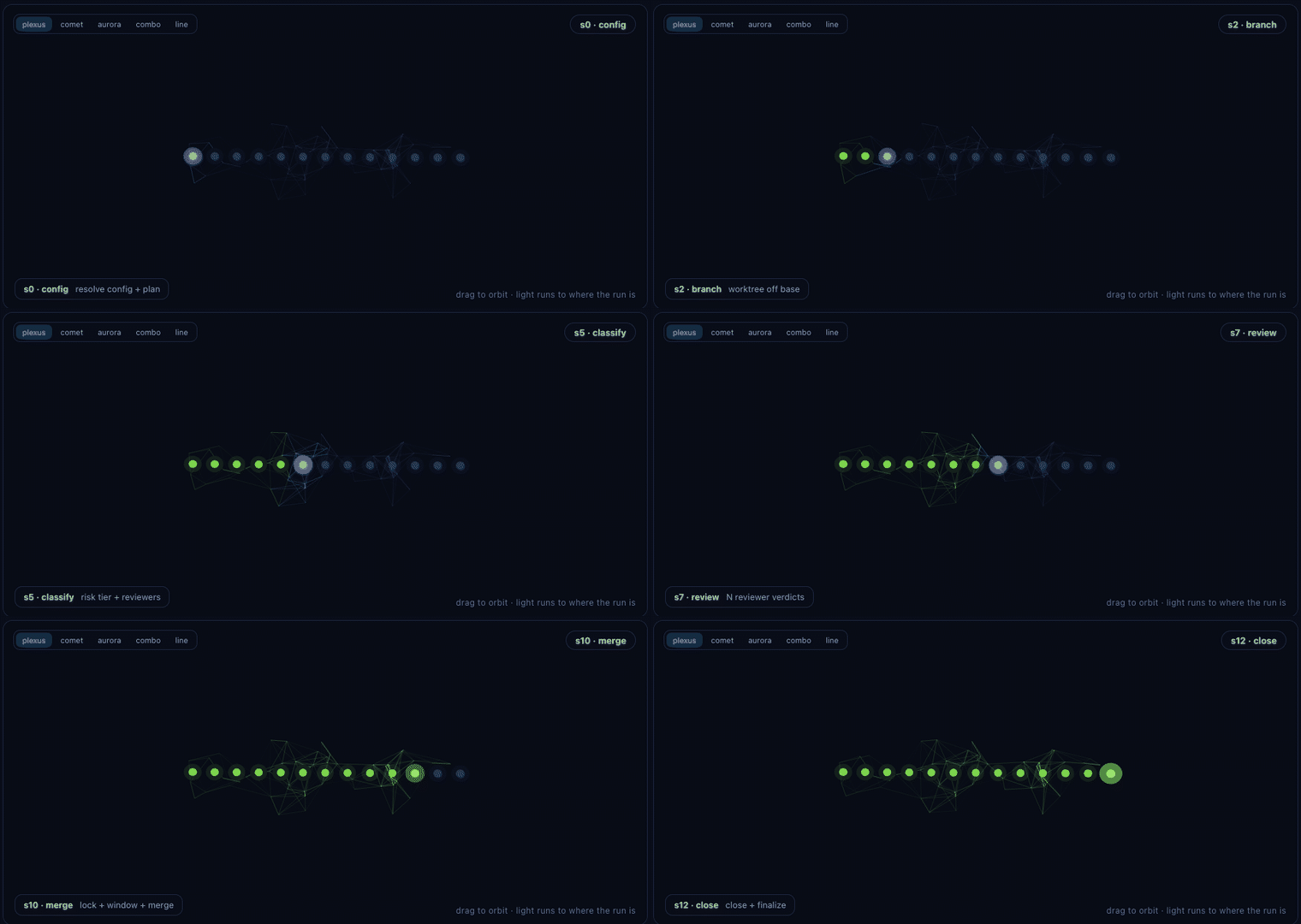
ship run on the review step — the combined 3D style, with the cross-vendor jury orbiting s7.play (live with --follow, looping demo with --loop), a dash board of every active worktree, and a self-contained web render.keel ship by hand, from an agent (Claude Code), or in CI. When an agent drives the run, you watch it alongside: play --follow in your own terminal, or render in a browser (no tty needed). How to watch →dash --all (terminal) and render --all (web) point at a parent folder and aggregate every keel project under it into a single board, grouped by project. The web board has a 2D grid / 3D scene toggle, follows your system light/dark theme, and an all / active filter fades and hides finished runs to keep live work in focus. It shows ship runs and non-ship commands (triage, morning, pr-loop …) live via the keel activity channel, each with its own phases. Local-only, fail-soft, one level deep.plexus (default), comet, aurora, combined and line — switch them from the in-scene selector. Same colours, different geometry./keel:<command> flows render their own phases from keel.flows. See the gallery →--follow shows the jury status live; --theater hands off to ai-jury's deliberation theater at the review step, then resumes. Fail-soft — no jury installed, nothing animates, nothing errors.pipx install keel-visual — pulls in keel-workflow (core) automatically. On PyPI.Learn more
docsThe visualizer reference, ship deep-dive, and the 17-command gallery. keel-visual docs →pypiDownload and version history. pypi.org/project/keel-visual →Multi-agent concurrency
Keel Swarm (experimental) — parallel waves & cross-model topology
⚠️ Experimental — the swarm reviews its own work only through the opt-in swarm-review, which has run once, on a sandbox repository. The planning commands run. A dry run's worker is keel ship, a dry assessment that never commits. swarm-run --live dispatches each cluster's implementer seat in its own worktree, then commits, gates, pushes and opens one pull request per cluster, under operator consent the parent delegates to each worker (#1400) — but those pull requests carry no review evidence, so swarm-land lands one through keel merge only once its review is recorded, by hand or by the opt-in swarm-review (#1287). Each issue is planned from its own Scope: declaration, and one that declares none is planned as * and runs alone (#1274). One live landing has run, on a sandbox repository, reviewed outside the swarm (#1281); swarm-review now reviews inside the swarm, opt-in, and has run once: on the same sandbox repository, run → review → land merged both pull requests and closed their issues with no hand step, with two review seats of a single vendor (#1423). Swarm stays experimental: one run on a toy repository, single-vendor review seats, and run, review and land are separate opt-in commands. Use /keel:ship for work you need merged — the description below is the design, not a supported workflow.
Keel Swarm is designed to scale work ownership from one issue to a backlog: cluster it into dependency waves, run parallel workers in isolated worktrees, route clusters across AI models, and land each wave under the merge lock. What runs today is the plan (keel swarm-plan) and a dry swarm-run; the cards below describe the design and say where the code stops short of it.
keel swarm-plan analyzes file-overlap conflict graphs from each issue's predicted scope, without executing code; dependencies are derived from that overlap. Orthogonal issues are placed in Wave 1 and dependent ones in later waves. Each issue's scope is read from the issue — a Scope: line in its body, or --issue-scope N=glob — and an issue that declares none is planned as * and serialised, never assumed disjoint (#1274).
.keel/worktrees/<swarm_id>/<cluster_id>/), so workers do not collide and dirty state stays contained. A live run does this; a dry run creates no worktrees, so its workers take turns in your own checkout. The worktree lifecycle also has open gaps — no orphan recovery, and swarm branches and directories left behind (#1278).
keel doctor --providers reports what a machine can actually reach.
keel ship run — on tier-3 work that can be the cross-vendor AI Jury panel (e.g. Anthropic + OpenAI + Google). swarm-land holds a cluster until its pull request clears keel merge's review-evidence gate — then merges that pull request through keel merge (#1287).
keel merge, one after another, each under the single-writer merge_lock. A pull request keel merge refuses — a conflict (DIRTY), the window, missing evidence — is held with the reason, and the next one is tried (#1287).
keel-visual swarm to render an HTML page showing the worktree clusters, each cluster's running/passed/failed state, and the run's landing mode — a rendered snapshot you re-run to refresh. keel-visual 0.9.0 rebuilds its DAG without the plan's scopes, so there it is always one wave with no edges; the next keel-visual release draws the plan swarm-run persisted, and says so when a run has none (#1280).
Swarm CLI commands
keel swarm-plan <cfg> --issues 12,15Compute the conflict graph from predicted scopes and partition the backlog into conflict-free execution waves (an issue with no declared scope runs alone — #1274). Swarm docs →keel swarm-run <cfg> --issues 12,15Experimental (#1423) — dry, one keel ship assessment per cluster; --live, each cluster's implementer seat in its own worktree and one unreviewed pull request per cluster, under the operator's delegated consent (#1400).keel swarm-status <cfg>Inspect each cluster's running/passed/failed status, its lead, and its difficulty band.keel swarm-review <cfg> --wave 1Experimental (#1423), run once, on a sandbox repository, with single-vendor review seats — opt-in: each cluster pull request reviewed by the cluster's own reviewer seats, read-only, their verdicts — approvals and change requests — posted through keel review pinned to the head.keel swarm-land <cfg> --issues N,N --wave 1Experimental (#1423) — merge each cluster's pull request in a completed wave through keel merge, one at a time; a pull request it refuses is held with the reason (#1287).keel-visual swarmRender the interactive 2D DAG and pseudo-3D spatial node topology as a snapshot (static HTML or served on localhost).Ecosystem & Compatibility
Works with the tools you already use.
One project-neutral workflow core. It installs as a plugin into Claude Code, Codex, Cursor (partial) and Antigravity, and the catalogue below covers 12 AI assistants · 6 LLM backends · 6 engineering skill libraries · GitHub Actions & MCP. Zero runtime lock-in, on-device, Apache-2.0.
17 workflows · /keel:<command>
Pick a command, watch it run
These are the agentic flows — every one is project-neutral: behaviour comes only from that repo's .keel/project.yaml. Select any of the 17 — its scene plays a scripted run, with its arguments and flags below.
Examples are illustrative — each command reads its values from .keel/project.yaml. Install them with keel install-adapter all or the agent plugin.
The deterministic core
The keel CLI
The CLI does the deterministic work — config resolution, gate planning & execution, risk-tier classification, merge window + lock, the fail-closed keel merge pipeline, evidence verification, checkpoint / resume and run controls. The workflow commands above are the agentic flows layered on top. Every flag is documented in the parameter reference.
keel setup --root .           # one command: init + adapters + validate + plan
keel validate <cfg>           # check against the schema
keel plan     <cfg>           # render the backbone
keel ship     <cfg> --root .  # dry assessment → decision
Layer 2 · values, not copied commands
Configured with a small project.yaml
A keel consumer is driven by values. Unknown keys are rejected by the bundled schema, so the reference is intentionally strict. knobs.team states the whole team — who implements, who gives the mandatory gate review from a different vendor, who reviews at each risk tier (or jury, when the cross-vendor panel is the review) and who applies the findings — and knobs.implement_mode: tdd makes s4 test-first, while knobs.loop gives the implementation up to max_iterations gate-judged passes — with tdd, only the implementation phase; the tests are written once.
extends: keel
core_version: "^1.0"
base_branch: main
timezone: Europe/Istanbul
merge_window: "07:00-01:30"

gates: [build, lint]   # gate names; the commands are knobs

knobs:
  build_gate_cmd: make test
  lint_cmd: make lint
  tier3_globs: ["src/keel/orchestrator.py"]
  implement_mode: tdd  # test-first s4 + tdd-order gate
  loop:               # with tdd: re-runs the implementation phase only
    max_iterations: 3   # still red after 3 passes: the issue blocks
  team:               # the whole team, as values
    implement:
      default: { provider: claude }
    gate:            # a different vendor, always
      provider: codex
      distinct_from: implementer
    review:
      by_tier:
        "2": [{ provider: claude }]
        "3": jury     # the panel IS the review
    fix: { provider: implementer }

extensions:          # add-only Lego
  pre-merge:
    - design-parity-gate

policy_pack:
  name: my-project
  labels:
    status: [status:backlog, status:in-progress]
    role: [core, docs]
Dogfooding
keel ships itself
keel's own config is .keel/project.yaml, and CI runs keel on keel-core on every push. If a gate fails, keel blocks its own merge — the same backbone every consumer gets. Here's that dry assessment: keel ship --dry-run decides MERGE or BLOCK and changes nothing; the merge itself is the /keel:ship adapter's job, in your agent.
Security
No telemetry, no surprises
keel sends no telemetry and ships a single runtime dependency (PyYAML; on Windows it also installs tzdata for the standard-library timezone database). Its network calls are deliberate and named, each made by a command you run: GitHub, through your authenticated gh, whenever a command reads or writes a pull request or issue (a live ship/merge, post-comment, review, capture-land and swarm-land among them); your git remote, when keel capture-land --write pushes a lesson onto the pull request; PyPI, for keel doctor's release check (skip it with --offline); a hosted-API delegate you choose (anthropic-api:, openai-api:, google-api:, or an openai-compatible endpoint), which receives the delegate's brief, issue text and diff included; the jury gate, when it is listed in gates:, which hands the diff to ai-jury and so to the reviewer providers ai-jury is configured with; and the gate commands and agent CLIs you configure, exactly as you set them. The optional keel-visual companion looks up titles through gh, and its 3D pages load three.js (SRI-pinned) from cdnjs when they open. The full list is in SECURITY.md.
run-gates / ship execute the build / lint / command Lego from your config. Review a config before running it on a sensitive repository — exactly as you would a Makefile or CI script.jury binary the s8 run is a no-op (reported SKIPPED; with no other gate planned it blocks), but a tier-3 merge still needs a jury verdict unless the run passes --no-jury.Security audits — published in the repo
2026-09No report — the month's security fixes (1.23.1: #1219, #1223; 1.24.0: #1247; 1.24.3: #1317) are listed under Security in the CHANGELOG.2026-08-15v1.14.2 line — by Google Antigravity (Gemini 3.7 Flash); centred on the swarm subsystem, with a re-check of core invariants (redaction, the remote-endpoint gate, ReDoS, the merge lock). When it was written, swarm's live path had never worked end to end (#1281); that path was built after it, in the 1.26.0 line, and this audit does not cover it. report →2026-06-15v1.3.0 line — by Claude (Opus 4.8); the keel-visual and website surfaces. report →2026-06-11v1.2.1 line — by Claude (Fable 5); prior follow-ups verified resolved. report →2026-06-09v1.0.1 line — secret scanning and consumer-neutrality follow-ups (resolved). report →2026-06-08Initial audit — trust boundaries, bandit, pip-audit, workflow & permission review. report →Three of the five reports were written by AI models acting as the reviewing security engineer, as each states; the June 8 and 9 reports do not record what produced them. The June reports cover source-level trust boundaries, static analysis (bandit) and dependency scanning (pip-audit); the August one is centred on the swarm subsystem, with a re-check of core invariants (redaction, the remote-endpoint gate, ReDoS, the merge lock), and reports no bandit or pip-audit run. Full policy: SECURITY.md
FAQ